
Model DR Safety Light Curtains
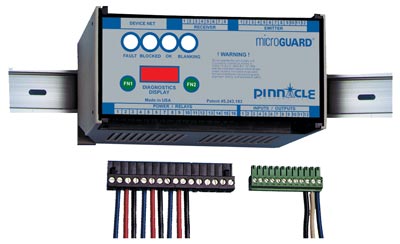
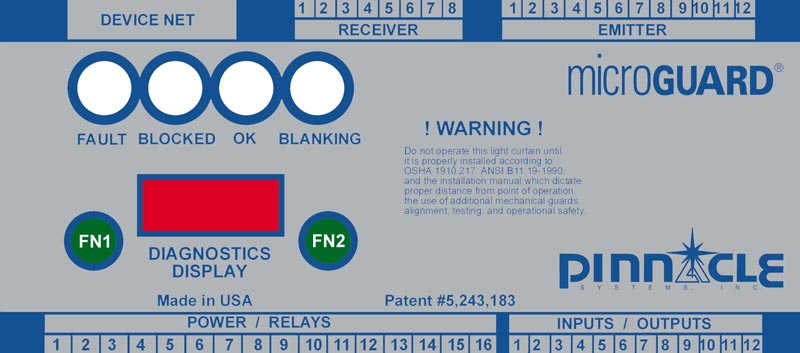
Model DR Safety Light Curtains have a DIN-rail mountable controller rated NEMA 1 (IP 10) for mounting into an existing control panel, and the pylons are rated NEMA 4 (IP 65). Input power is 24VDC.
Complete system diagnostics, blanking capability, mounting brackets, and connecting cables are supplied standard.
Type 4 / Category 4
Made in USA
Standard Features and Capabilities
Compliance & Safety Standards
- Meets or exceeds OSHA, ANSI, CSA, RIA, CE standards, UL Subject 491, UL1998, IEC 61496 standard parts 1 and 2
- Diverse redundant design concept
- Utilizes captive contact force-guided safety relays
Controller & Physical Design
- Small and compact DIN-rail Mountable Controller
- Small and compact safety light curtain Model DR pylons
- Universal controller for all pylon sizes
Installation, Wiring & Maintenance
- Snap-out wiring terminals reduce both installation and maintenance time
- Quick disconnect wiring at pylons
Diagnostics, Indicators & Operator Awareness
- Multiple status indicators for operator awareness
- Diagnostic message display built-in
- Multi-lingual diagnostic display available
- Remote status display (RSD) capable
Blanking, Control Features & System Functions
- Largest selection of blanking options available—fixed or floating blanking
- Patented “auto blank” capable controller
- External relay checking built-in
- Emergency stop input built-in
- Auxiliary relay output built-in
- Fault relay output built-in
- Remote latching reset built-in
- Remote indicator lights output provision built-in
- Push button reset with memory
- Analog output for non-safety related applications (optional) -10v to +10v or 0 to +10v (consult factory)
Sizes, Options, Warranty & Origin
- Largest selection of sizes available
- Largest selection of options available
- Two-year warranty on the Safety Light Curtain Model DR
- Made in USA
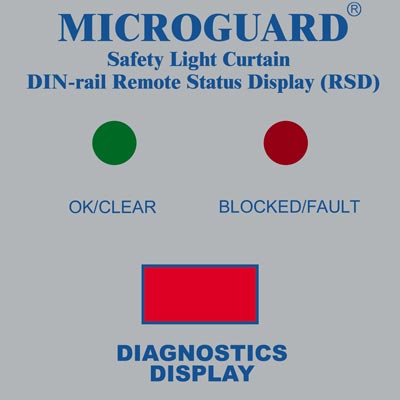
Remote Status Display (RSD)
The optional Remote Status Display (RSD) may be used in conjunction with the MicroGuard DIN-rail Controller. The RSD provides the machine operator and front line supervisor immediate system status and diagnostics when the DIN-rail Controller is mounted inside the machine control panel. The RSD can also control all blanking options if that style light curtain is used.
Remote Status Display (RSD) Components:
–Red/Green/Yellow indicator lights
–Diagnostic scrolling message display with 5’ (1.5m) of connector cable
–Keyed selector switch and yellow blanking active indicator supplied if blanking is used
–Customized Blanking Available
The RSD components are mounted on a steel plate and are designed to be exterior panel mounted. The RSD option enhances safety and is a time saver at machine set-up and when maintenance diagnostics are required.
Dimensions 3.7” (94mm) x 3.7” (94mm) Center to Center
Standard System Features
Specifications
Blanking Options

Auto-Blanking – (AB) Option
The advanced “Auto Blank” option is unique because it will automatically blank out only the required number of beams needed to accept an obstruction such as a conveyor, bracket, or fixture. The unit is easily programmed by a supervisory controlled four-position keyed selector switch located on the front panel of the MicroGuard Controller (shown left). The “Auto Blank” method of blanking is much safer than DIP switch or master/slave blanking systems because only the areas of the obstruction will be blanked. This feature prohibits unsafe oversizing of the blanked area commonly found throughout the industry on manually blanked systems. “Auto Blank” also eliminates the need to count beams and to locate where and what beams are to be shut off to obtain the correct beam elevation to accept an obstruction. This information is displayed on the message display of the controller. “Auto Blank” will also watch the obstruction and, if it moves or is removed, will go into a “machine stop mode” to prevent further machine operation. This is an additional safety feature not available on manually blanked units. These features truly enhance production while providing the ultimate in safety.
When the key switch is turned to the “Auto Blank” function, the “External Diagnostic Message Display” will show the number of blocked beams and where the obstruction is in the light curtain, then verify that the obstruction is being monitored. This is required information for the depth penetration factor and for proper installation of any safety light curtain.
The versatile “Auto Blank” (AB) blanking series includes:
- Constant scan light curtain
- One beam floating blank built-in plus “Auto Blank” capability
- Two “Auto Blank” modes – up to 4” blanked out (larger sizes available upon request) but need not be sequential
- One “Auto Blank” mode with keyed reset when guarded zone is penetrated
- One “Auto Blank” mode with automatic reset when guarded zone is penetrated
Floating Blank – (8K) Option
The “Floating Blank” option provides the flexibility necessary to effectively guard all types of equipment that require multiple floating beams. This is quite common in the fabricating industry where the work piece moves.
The “Floating Blank” permits work pieces to be formed vertically or horizontally through the guarded area without shutting down the machine. Entry into the protected area by the operator or passerby will prevent the start or, if the machine is in motion, will provide a signal to stop the machine.
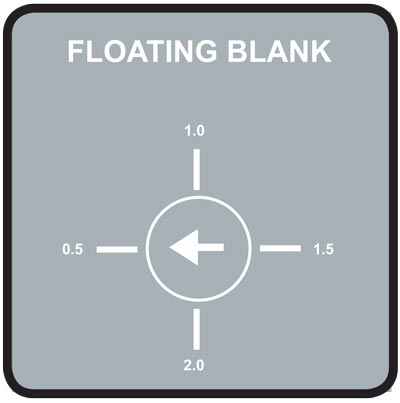
The “Floating Blank” is controlled by a keyed selector switch that will allow a work opening of 2” (51mm) based on 1/2” (13mm) increments (shown left). This information is displayed on the message display of the controller. Blanking adjustments required when die heights change are not necessary. The “Floating Blank” light curtain automatically adjusts to the various feed positions providing production with protection.
The “Floating Blank” (8K) Option includes:
- 1/2” (13mm) – Constant scan light curtain
- 1” (25mm) – One floating beam
- 1-1/2” (38mm) – Two floating beams
- 2” (51mm) – Three floating beams
Dimensions
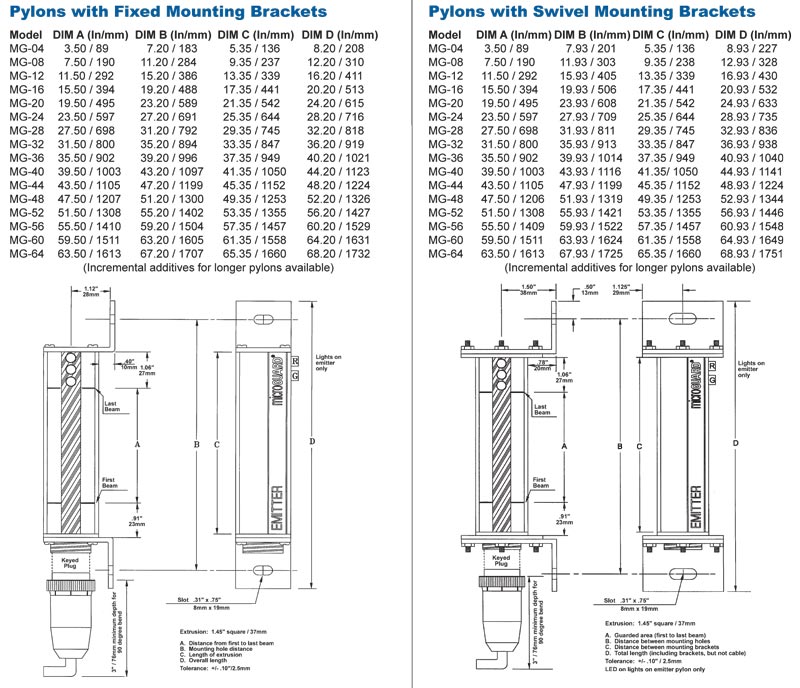
Replace “MG” with a “DR” (below) when ordering the Safety Light Curtain Model DR
Accessories
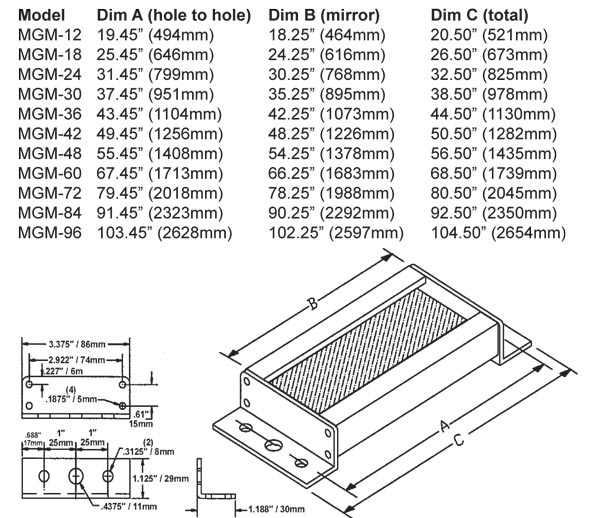
Cornering Mirrors
Through the use of cornering mirrors, multiple sides or work envelopes can be guarded, which enhances safety and reduces downtime related to mechanical and electrical interlock systems. Include a 15% reflectivity loss per mirror when calculating the total scanning distance of the light curtain.
Pedestal Dimensions

The heavy-duty, all-welded steel pedestal floor mounts can be used for mounting either light curtain pylons or cornering mirrors. Sliding mounts on the pedestal are of universal design and are supplied standard. Unique floating base on pedestal is designed to compensate for uneven floors.
NOTE: Pedestals must be bolted to the floor; they must not be movable (ANSI B11.19-2010).
Features:
- Sliding mounts supplied
- Standard height is 72” (1829mm) – Model #8000
- Optional 96” (2438mm) – Model #8096
- Painted OSHA yellow
- Pedestal is 12-gauge steel
- Base Plate is 1/4” (6.35mm) steel plate
Ordering Procedure
Specify Pedestal Model Number and Quantity
Model 9000 and 9500 Mounting Brackets
Excellent method of mounting the light guard for press brakes or when the light guard is to be moved for die setups or machine maintenance. Model 9000 consists of three 180° pivot points along with light guard diagonal movement capability for virtually unlimited light guard positioning. Two-inch square tubing is 3/16” thick, painted OSHA yellow, and mounts directly onto the machine housing, which makes for a heavy-duty yet versatile mounting bracket. Model 9500 consists of two 180° pivot points and one adjustable-length arm.
Model 9000

Model 9500

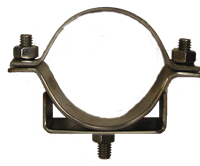
Part # 11-183: Two-piece adjustable mounting bracket for pedestals (with one mounting stud 5/16”-18 stud). Stainless Steel (for Mirror and Guard pylon)
(Two required per pedestal)

Part # 11-184: Two-piece adjustable mounting bracket for pedestals (with one mounting stud 5/16”-18 studs 90 degrees apart). Stainless Steel (for Guard at one corner)
(Two required per pedestal)

Part # 11-199: Two-piece adjustable mounting bracket for pedestals (with two mounting studs 5/16”-18 studs 180 degrees apart). Stainless Steel (for multiple Guards mounted side by side)
(Two required per pedestal)

Polycarbonate Tube: Optional Polycarbonate tube, which will encase the pylons for high impact protection.
Ordering and Pricing Procedure
Replace MG with DR (below) when ordering Safety Light Curtain Model DR

Safety Light Curtain Model DR Controller Module Housing
DR – 35mm DIN-rail Mountable Controller Module (24VDC Input Power Only)
Pylon Sizes (Protected Area in inches)
1/2” (13mm) Beam Spacing: 04, 08, 12, 16, 20, 24, 28, 32, 36, 40, 44, 48, 52, 56, 60, 64, 68, 72, 76, 80, 84, 88, 92, 96, 100, 104, 108, 112, 116, 120
1” (25mm) Beam Spacing: 04, 08, 12, 16, 20, 24, 28, 32, 36, 40, 44, 48, 52, 56, 60, 64, 68, 72, 76, 80, 84, 88, 92, 96, 100, 104, 108, 112, 116, 120
4” (102mm) Beam Spacing: 20, 28, 36, 44, 52, 60, 68, 76, 84, 92, 100, 108, 116
Customized Blanking Available (consult factory)
Light Curtain Style and Beam Spacing
1/2” (13mm) Spacing of Beams
OF – Constant scan – no blanking.
1F – 1 beam floating blank built-in.
8K – Up to 3 beam floating blank adjustable by the use of a keyswitch removable in all positions. Capable of constant scan or one, two, or three floating beams.
AB – Includes a constant scan light curtain, one beam floating blank, and two auto blank modes.
CE – No blanking, 24VDC input power, 2° angle of divergence, and CE certified (designed to conform to the European Market and worldwide IEC 61496 Parts 1 & 2 Standards).
1” ( 25mm) Spacing of Beams
OF1 – Constant scan – no blanking.
1F1 – 1 beam floating blank built-in.
8K1 – Up to 3 beam floating blank adjustable by the use of a keyswitch removable in all positions. Capable of constant scan or one, two, or three floating beams.
AB1 – Includes a constant scan light curtain, one beam floating blank, and two auto blank modes.
CE1 – No blanking, 24VDC input power, 2° angle of divergence, and CE certified (designed to conform to the European Market and worldwide IEC 61496 Parts 1 & 2 Standards).
4” ( 102mm) Spacing of Beams (no blanking options available, constant scan only)
OF4 – For perimeter guarding, body detection. 4.25” (108mm) object sensitivity. 4” (102mm) active area followed by a 4” (102mm) gap.
Options (Add underlined suffix to part number)
SMB – Swivel Mounting Brackets for Pylons: Replaces the fixed mounting brackets normally supplied. Provides a 360 ° rotation of pylons.
MO – Guarding Mute-Out: Mutes out the light curtain during the non-hazardous portion of the machine cycle.
32-108 – High Load Safety Relay – 110 VAC – 20 AMP high load safety relay incorporates a 110 VAC coil with 3 NO (held closed) and 1 NC contact. Each light curtain requires two relays. Dimensions: (45mm width x 91mm length x 85mm height)
32-109 – High Load Safety Relay – 24vdc – 20 AMP high load safety relay incorporates a 24vdc coil with 3 NO (held closed) and 1 NC contact. Each light
curtain requires two relays and EDM feature. Dimensions: (45mm width x 91mm length x 115mm height)
DN – DeviceNetTM: Fieldbus network compatible.
Extended Range Units: 21’ (6.4m) to 75’ (24.8m) scanning distances (specify desired scanning distance).
RSD – DIN-rail Remote Status Display (RSD): Remote mounting plate providing a single location to mount the following on existing panel door: light curtain scrolling diagnostic message display, blanking option keyswitch (if applicable), and status indicator lights (all styles).
CI – Cincinnati Interface: Requires the MicroGuard to issue a stop command every machine cycle (built-in standard on the Metal Box Controller Module).
AO – Analog Output for Non-Safety Applications: -10VDC to +10VDC or 0VDC to +10VDC.
Extra Pylon Protection (Optional)
PT – Polycarbonate tube which will encase the pylons for high impact protection.